Workaround to launch Web Interface & Web Recorder on Chrome version 144
Print
Modified on: Tue, 10 Feb, 2026 at 4:12 PM
Step to launch Web Interface Viewer
- Go to this location on your machine and unzip this folder if it is not yet unzipped: C:\Users\Public\LogiGear\TestArchitect\extension\pom-builder\pombuilder-lite.zip
- Start TestArchitect Client and create a new Interface Entity
- Launch the Web Interface Viewer from the TestArchitect Client toolbar menu -> Tools -> Web Interface Viewer
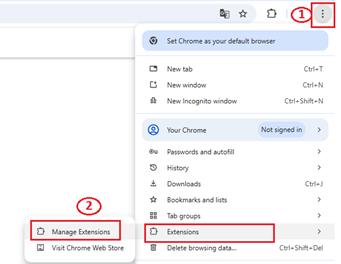
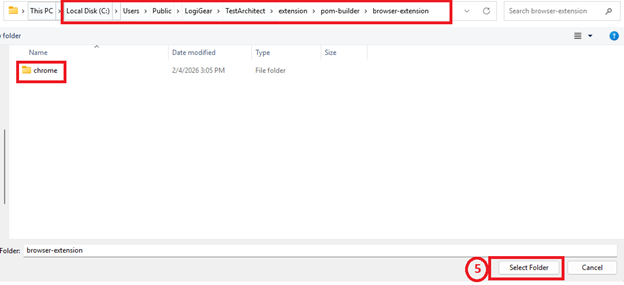
- Follow the steps 1-> 5 as in the screenshot to load 'chrome' package from this location C:\Users\Public\LogiGear\TestArchitect\extension\pom-builder\pombuilder-lite\browser-extension

Step to launch Web Recorder
- Go to this location on your machine and unzip this folder if it is not yet unzipped: C:\Users\Public\LogiGear\TestArchitect\extension\webrecorder\webrecorder.zip
- Start TestArchitect Client and create a new Test Module
- Launch the ‘Web Recorder’ from the TestArchitect Client toolbar menu -> Tools -> Web Recorder
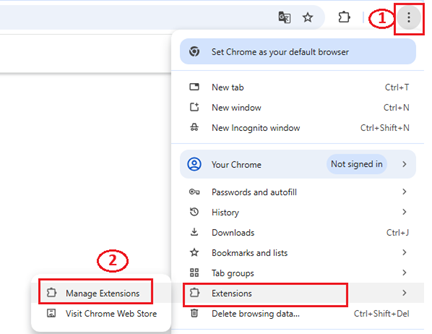
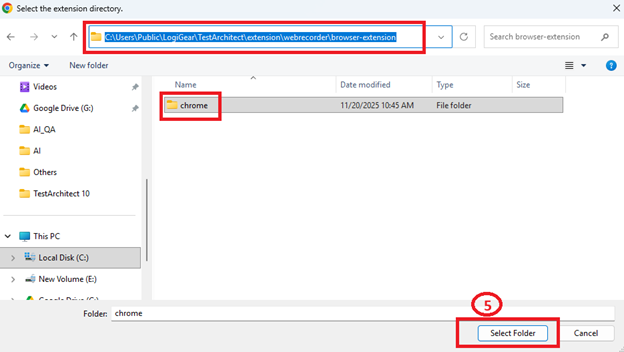
- Follow the steps 1-> 5 as in the screenshot to load 'chrome' package from this location C:\Users\Public\LogiGear\TestArchitect\extension\webrecorder\webrecorder\browser-extension

Did you find it helpful?
Yes
No
Send feedback Sorry we couldn't be helpful. Help us improve this article with your feedback.
